Echoview calibration supplement files
The Echoview calibration supplement file (ECS file) enables you to change calibration values used in calculations for your data. The ECS file is a text file that is added to a fileset using the Calibration section of the Filesets window. The file can be edited in a plain text editor and may contain settings that modify Calibration sources. Only acoustic variables that belong to the fileset associated with the ECS file will have access to the calibration settings the ECS file defines.
The Calibration section of the Calibration page of the Variable Properties dialog box is where you can:
- read the variable's Calibration source name
- view the calibration values applied to an acoustic variable
Appropriate calibration values, from an ECS file can be applied automatically or specifically, and allow your data to be analyzed quantitatively.
Echoview offers a process in which a templated ECS file is created and tailored to your data; this file can contain (source) Calibration values that are used, and file administration comments.
Notes:
- Calibration settings on the Variable Properties dialog box use colored-text-cues to indicate the processing that has been done since the data and ECS files were loaded. For more information refer to Calibration page: Settings and Notes.
- An ECS file can be added to multiple EV files. Also EV file templates copy the ECS path and file name. One consequence of this convenience, together with the override nature of settings applied by an ECS file, is that Fileset or SourceCal settings may affect multiple EV files or multiple variables.
- Modified calibration settings are applied when you recalculate and step through the pings of the echogram.
- Changes in calibration settings used for range calculations may shift ping data in the depth dimension but will not automatically adjust the position of regions and lines. You should review any existing regions and lines to ensure they are still valid. For more information refer to Range calculation effects on regions and lines.
- Data files that record single target detections may not work as expected with calibration values specified by an ECS file. Single target detection data files are unlikely to have the source data or the single target detection equations to recalculate single target detection data under different calibration settings. Raw single target detection variables can be derived from Simrad EK500 telegrams, Furuno .hac files, HTI .raw files, Precision Acoustics Systems .ts4 files. Single target detection data may also be included in ASCII and HAC Generic and EK500 data files.
Order of override ability for calibration settings

Figure 1. Order of precedence for Echoview calibration values.
Settings to the right override those to the left. For example Data file settings override Default settings. Fileset, SourceCal and LocalCal settings are specified in an ECS file. LocalCal ECS values require a deliberate direction for use via the LocalCal list setting on the Calibration page of the Variable Properties dialog box. See also Calibration data workflow.
- Grammar and syntax
- Error handling
- Example of an ECS file
Grammar
Valid characters in the file
|
[a...z], [A...Z], [0...9] Decimal point Punctuation, Braces, other characters |
Calibration setting names are limited to alphanumeric characters. All alphabet text is case insensitive. To improve readability, use words delineated by capitalized initials (CamelCase).
|
| # |
Use # before text to indicate a comment. The file can contain other information as comments (in any language). A comment starts with the comment character #, and continues to the end of the line. A comment can occur on a line by itself or follow text used by Echoview. Comments are ignored by Echoview. For example:
|
| Keywords |
Note: LocalCal names support international characters. |
| Calibration source name | Calibration source name |
| Calibration setting name | Calibration settings |
| an equals sign [ = ] | Used between a calibration setting name and the setting's value. |
| a space |
Spaces are ignored unless they break up a name or number. Spaces are also used to separate values in an array. |
| a value |
A calibration setting's value. Often, this is a numerical value but some calibration settings are specified by a string of text. |
Calibration source
An ECS template lists suggested calibration settings for the SourceCal Calibration source name. Every acoustic variable has an assigned Calibration source.
Data file derived Calibration sources
Every raw variable has a source from which it derives its calibration. Calibration sources are derived from data files in the fileset. The name of this source is the familiar description, derived from the transducer and channel names, added to the end of the raw variable name. For example:
The raw variable Sv Ping T1 uses the Calibration source T1.
The ME70 raw variable Sv pings formed beams uses the Calibration source "formed beams".
Even if no calibration data is available in the file, a Calibration source still exists, but it is empty. Where a calibration setting is required for a calculation and a data file setting is absent then a default setting is used.
A fileset can have more than one (data-derived) Calibration source. Multiple Calibration sources may arise because the data is multiplexed into channels or records more than one frequency.
To modify calibration
Any saved changes to the parameters in an ECS file recalculates variables and updates any displayed echograms. You can modify calibration with an ECS file in the following ways:
| Echoview Calibration Supplement feature | Action | ||||
|
Fileset
CalibrationName = value
|
Calibration settings that are added at the start of the ECS file are fileset-level calibration values. Fileset-level settings override settings of the same name in all fileset Calibration sources. For example:
This gives a value for sound speed for all Calibration sources (and hence all variables) in the fileset, even those not named in the ECS file. If values for sound speed are given in the data files they are ignored. The value can be modified again by using SourceCal or LocalCal. Each calibration setting is on a line by itself. The setting consists of a calibration name (which is all one word), an equals, and a value (in this case a number). Calibration names are case insensitive. |
||||
|
SourceCal NameOfExistingSource followed by a list of
CalibrationName = value |
The keyword SourceCal defines a section where suitable calibration settings are listed for the named Calibration source. This allows the settings to supplement or override the settings for the Calibration source read from the echosounder data file. For example:
This gives values for absorption to be used with the settings in Calibration source T1. If the data files have values for absorption or pulse length for Calibration source T1, the specified values will override the pre-existing values. A warning is given if no such Calibration source is found. The SourceCal declaration is on a line by itself. SourceCal and the Calibration source name are not case sensitive. |
||||
|
followed by a list of
CalibrationName = value |
The keyword LocalCal specifies a group of calibration settings which can be used to override the source calibration for a single variable. This is in contrast to SourceCal which overrides or supplements values for all variables that use the calibration source. For example:
MySet appears under the LocalCal list on the Calibration page of the Variable Properties dialog box. The LocalCal settings override any other matching settings. LocalCal settings are not inherited (refer to Inhertiance of Properties). The LocalCal declaration is on a line by itself. LocalCal and the name are not case sensitive. The use of LocalCal is described in the Example.
|
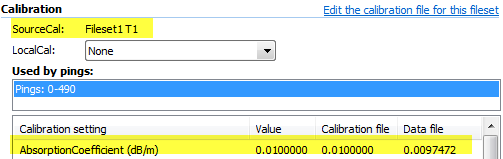
The calibration settings that Echoview uses can be viewed and modified when you use:
- New on the Filesets window
- Edit the Calibration file used by this fileset link on the Calibration page of the Variable Properties dialog box.
Notes:
- Help menu > Calibration Information displays the calibration settings used in pre-Echoview 5.0 EV files. When no EV file is selected, a list of all available calibration settings is displayed. Such information can be helpful in the creation of custom calibration settings (use Copy/Paste). See also Calibration Information dialog box.
- To apply modified calibration settings, repeat the calculation.
Calibration settings
Each calibration setting is on a line by itself. The setting consists of a name (which is all one word), an equals, and a value. Calibration setting names are not case sensitive. New ECS files may list compatible calibration settings.
- Common calibration names
- Calibration names used by sonar specific raw variables
- Used by raw acoustic variables
- Used by raw variables that can have logging or processing settings
- ASL Environmental Sciences binary data format
- BioSonics data format
- Echoview Data File format
- Furuno data format
- HTI data format
- Nortek data format
- Sonic data format
- PAS HARP data format
- SM2000 data format
- Simrad EK80 data format
- Simrad omnisonar netCDF4 format
Note: Information includes Calibration name, Help file terminology, Default value, Decimal places, Minimum value and Maximum value.
See also: Calibration setting pages for file formats.
Version number
Keywords: Version
An ECS file created by New on the Filesets window, starts with a version declaration, For example:
Version 1.00
The version number affects error handling.
Warnings and errors
Echoview may display diagnostic warnings and error messages about the content of an ECS file. Such messages are sent to the Messages dialog box. Any errors cause the ECS file to be ignored. An ECS file that Echoview can't read is flagged (in the Filesets window) with a red cross and a message in the Message dialog box, and causes raw variables to become unavailable.
Warnings
Warnings are of the form:
Calibration file 'FileName', on line N (Cal): Message
where:
- FileName is the name of the ECS file
- N is the line number
- Cal is the name of the containing SourceCal or LocalCal (if any)
- Message is a short sentence describing the nature of the warning.
Particular warnings
- A warning is given when a Calibration source named in the ECS file does not appear in the first data file. This is usually a mistake, except in the rare case where the Calibration source only appears in later data files.
Errors
Errors are of the form:
Ignored calibration file 'FileName' because on line N (Cal): Message
where:
- FileName is the name of the ECS file
- N is the line number
- Cal is the name of the containing SourceCal or LocalCal (if any)
- Message is a short sentence describing the nature of the error.
An example ECS file
Figure 3. An example ECS file.
Figure 4. Calibration values used by Echoview (i.e. Value column) on the Calibration page of the Variable Properties dialog box for the ECS example. The Calibration file column lists values read from the ECS file. The Data file column lists values read from the echosounder data file.
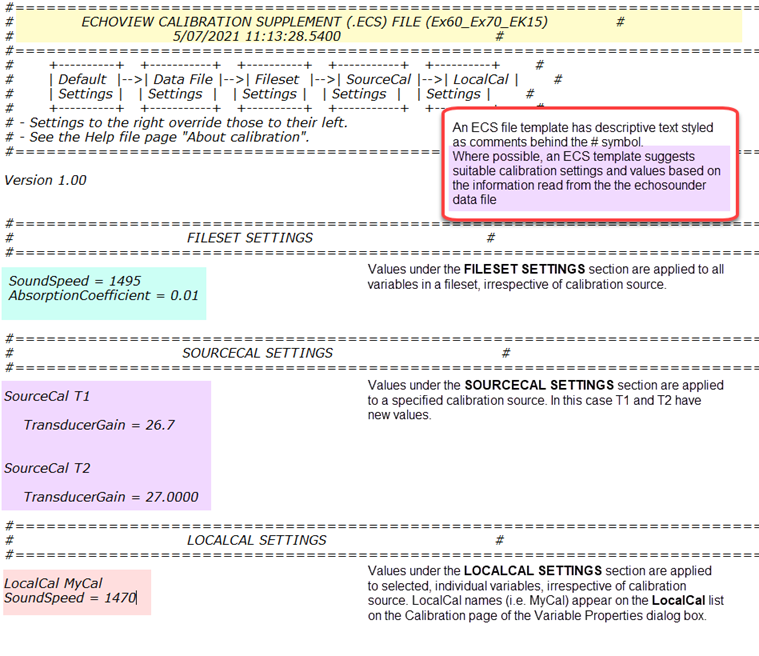
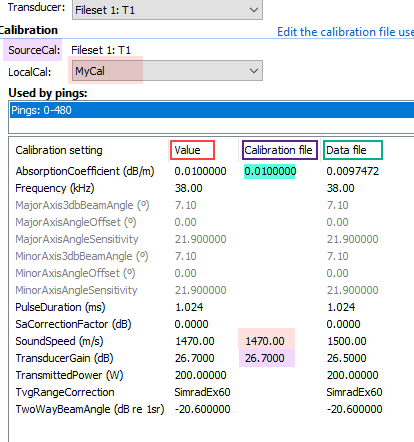
For variables that use T1:
|
Supplemental calibration settings from |
Calibration settings used by Echoview under the Value column |
|
FILESET SETTINGS |
The values under the FILESET section of the ECS file are applied to all variables in the fileset regardless of calibration source. In effect they are global values.
|
|
SOURCECAL SETTINGS SourceCal T1 |
Echoview respects the FILESET values and then uses SOURCECAL T1 values followed by T1 calibration source values that have not been overridden by LOCALCAL MyCal values.
|
|
LOCALCAL SETTINGS LocalCal MyCal |
Echoview respects the FILESET values and then uses SOURCECAL T1 values followed by T1 calibration source values that have not been overridden by LOCALCAL MyCal values.
|
Variables with other calibration sources (e.g., T2) will not be affected by SourceCal T1 values. The variable's Variable Properties will list MyCal as a LocalCal option and the variables will also respect the ECS Fileset calibration values.
If you change a calibration setting in the ECS file but the Calibration page of the Variable Properties dialog box does not change and no error or warning message appears, check that you have removed the hash symbol in front of the setting. Echoview ignores any text after a hash symbol.
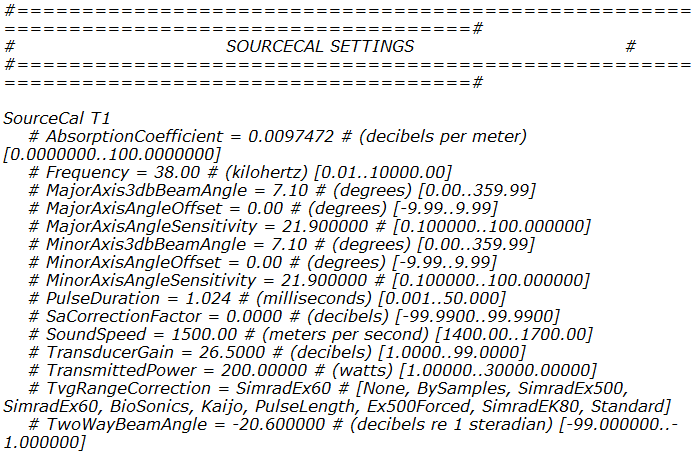
Figure 5. ECS template - suggested values preceded by hash symbols.
See also
About calibration settings
ECS and new EV files
ECS and pre-version 5.0 EV files
ECS file error handling
Calibration settings for data formats
Calibration settings for virtual variables
About_Echoview_calibration_files