About depth, range and altitude
Depth is a measure of vertical distance below a system reference water level. Range is a measure of linear distance from the center of the transducer face. The altitude of objects is calculated with respect to the position of the platform system reference point.
Echograms can be displayed in Depth or Range mode. You choose the mode on the Echogram page of the EV File Properties dialog box. The appearance of an echogram will be unaffected by a change of mode, but the reported distance in the toolbar will be affected as will any visible depth/range grid lines and depth/range related analysis variables which are exported.
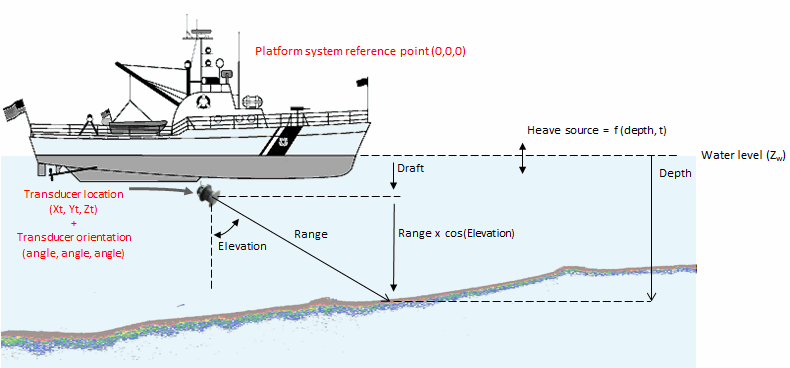
Figure 1: The contributions to the depth.
General depth and altitude formulas
Depth = Range x Cos(Elevation) + Draft + Heave
Altitude = ((Range x Cos(Elevation)) + (Zt - Za)) + Heave) x -1
where:
Draft = Zt - Zw
Zt = Z - vertical offset (m) on the Geometry page of the Transducer Properties dialog box
Zw = Z coordinate level of the water surface on the Position page of the Platform Properties dialog box
Za = Altitude of the system reference point on the Position page of the Platform Properties dialog box
Elevation = Elevation on the Geometry page of the Transducer Properties dialog box
Heave = Depth of the Heave source line at the current time
When heave is applied ping depth can change. When heave is applied ping range is unchanged. To preserve the integral relationship between samples in successive pings, heave is rounded to the nearest sample height before being applied to a ping. The exceptions to this are raw single target variables and sounder-detected bottom lines, which do not consist of samples. For more information refer to About heave compensation.
Downward pointing transducer
In the case of a downward pointing vertically oriented transducer, where transducer elevation equals zero:
Depth = Range + Draft + Heave
Altitude = ((Range + (Zt - Za)) + Heave) x -1
A special case
The relationship between depth and range plus transducer geometry as expressed above, can change (while processing in Echoview). The depth is no longer a function of the range and the transducer geometry when a Beam Select virtual variable is created from a multibeam variable. In this case, the depth/range relationship is worked out internally using the angle of the selected beam. Further information about beams in multibeam echograms can be found in the About sector plots and beams.
See also
About single target depths
About transducer geometry
About draft
Calculating range and depth from exported data
About heave data
About heave compensation