Transducer Properties dialog box
The Transducer Properties dialog box is used to enter the location, orientation and calibration settings for a transducer.
To display the Transducer Properties dialog box from the Dataflow window:
- Select a view that contains a transducer
- Double-click the Transducer icon,
-OR-
Select the Transducer icon, then
Press F8
-OR-
Choose Transducer Properties from the Shortcut (right-click) menu
-OR-
Choose Transducer Properties from the Dataflow menu
You can also inspect, modify and export the settings on this dialog box with the Properties Action.
General page
The General page of the Transducer Properties dialog box is used for naming and recording information about the selected transducer.
|
Settings |
Description |
|
Name |
Displays the name that will be used to identify this transducer in Echoview. See also: Supported characters for names. |
|
Frequency |
Displays a frequency value (kHz) associated with the transducer. Transducer Frequency may not be assigned when the transducer is created however it can be manually specified. The Transducer Frequency is separate from an acoustic variable's calibration Frequency. |
|
Fileset |
Displays the Fileset associated with the transducer when it was created. Transducer Fileset is read-only. Transducer Fileset may not be assigned when the transducer is created. |
Notes:
- A message will be displayed in red beneath the notes text box warning that changes to the transducer settings will affect variables!
- Transducers are created on the first generation of a raw variable and will use that variable's information in the name (TransducerN, ChannelN etc). Additional raw variables, especially in HAC and EVD files, assign a transducer based only on fileset and frequency information. Consequently, the name of subsequent raw variables attached to a transducer may have no connection to its name.
Geometry
Use the settings on this page to specify and visualize the transducer's 3D orientation, location and beam rotation relative to the platform.
Note that the Platform type affects the names and defintions of some settings. Refer to their descriptions for details.
Orientation section
Specify the transducer orientation with a combination of either the Elevation and Azimuth coordinate system or the Alongship and Athwartship coordinate system, and the beam rotaion.
|
Settings |
Description |
|
Elevation (degrees) |
Transducer elevation angle between 0.00° and 180.00°. |
|
Azimuth (degrees) |
Transducer azimuth angle between 0.00° and 359.99°. The front of the platform is 0°. |
|
Beam rotation (degrees) |
Beam rotation angle between 0.00° and 359.99°. 0° points the semi-minor axis—a red line in the Interactive image—to the front of the platform, given 0° elevation and azimuth. If Visualize as multibeam is toggled, the sector is displayed athwart the platform, given 0° elevation and azimuth. |
|
Alongship (degrees) or South-North (degrees) |
Alongship or South-North for mobile or fixed platforms respectively, between -180.00° and 180.00°. The entry is red for invalid angles and the Interactive image will not update. |
|
Athwartship (degrees) or West-East (degrees) |
Athwartship or West-East for mobile or fixed platforms respectively, between -180.00° and 180.00°. The entry is red for invalid angles and the Interactive image will not update. |
Location section
Specify the Location of the transducer relative to the platform.
|
Settings |
Description |
|
X - alongship offset (m) or X - south-north offset (m) |
Alongship or south-north for mobile and fixed platforms respectively. Positive values move the transducer toward the bow or northward. |
|
Y - athwartship offset (m) or X - west-east offset (m) |
Athwartship or west-east for mobile and fixed platforms respectively. Positive values move the transducer starboard or eastward. |
|
Z - vertical offset (m) |
Often used to set a transducer draft. Positive values are downwards from the water surface. |
Visualization section
|
Settings |
Description |
|
Visualize as multibeam |
Toggle the checkbox to convert the Interactive image from a single beam cone to a multibeam fan. This is for visualization purposes only. |
|
Interactive image |
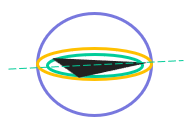
The image is not to scale. The water surface is displayed as a checked pattern. The platform icon is a triangle.
Use the mouse wheel to zoom, and click and drag to rotate the image.
Figure 1: The platform icon and platform plane, transducer face plane and plane orthogonal to the transducer face. The pointing direction of the platform is towards a heading for a moving platform, or North for a fixed platform. |
Notes page
|
Settings |
Description |
|
Location description |
The Location description text describes the location of the transducer on the platform. For an ICES CSV export, ideally this is the ICES name code for the platform location of the transducer. If the ICES code is not used, Echoview attempts to match the text to the ICES code description. |
|
Transducer beam type |
The ICES name code for transducer beam type. |
|
Calibration date |
Select the checkbox to browse the Calibration date list and specify the date the transducer was calibrated (dates earlier than 1970 are not supported). If the box is unchecked, Echoview uses no date. |
|
Calibration acquisition method |
The Calibration acquisition method text describes the physical process used to calibrate the transducer. For an ICES CSV export, ideally this is the ICES name code for the calibration acquisition method. If the ICES code is not used, Echoview attempts to match the text to the ICES code description. |
|
Calibration processing method |
The Calibration processing method text describes the calculation method used to calibrate the transducer. For an ICES CSV export, ideally this is the ICES name code for the calibration processing method. If the ICES code is not used, Echoview attempts to match the text to the ICES code description. |
|
Calibration accuracy estimate |
The Calibration accuracy estimate records the estimation of the accuracy for the calibration of the transducer. |
|
Ping duty cycle |
The Ping duty cycle text describes the nature of the ping rate. |
|
Triwave correction used |
The Triwave correction used text indicates the status of the AC Triwave correction used with the transducer. For an ICES CSV export, ideally this is the ICES name code for AC Triwave correction. If the ICES code is not used, Echoview attempts to match the text to the ICES code description. |
|
Notes |
Your description. |
Note: Other survey related information may be specified under Survey Metadata of the Notes page of the EV File Properties dialog box.
See also: Export to ICES CSV
See also
About Transducer Geometry
Transducer geometry illustrated - fixed platform example
About setting variable properties
About calibration settings
Using a SoundSpeedProfile: Notes