Scripting with COM objects
The Automation module allows you to use Echoview COM objects to control and interrogate Echoview. COM automation allows third parties to develop scripts and applications that interact with Echoview in a well-defined and easy to use manner. Details about registered COM objects found by Echoview can be found on the Scripting page of the Echoview Configuration dialog box.
A useful overview of scripting for Echoview is Getting started with scripting.
COM provides several advantages over our previous scripting implementation:
- The COM object can query Echoview as it runs. This allows you to make informed decisions.
- Operations can be easily performed on multiple objects, or an entire collection.
- The object is immediately informed of the failure of a procedure call. This makes it easier to find the source of a failed export or an unexpected result.
- Echoview does not have to initialize and terminate for each script. This has the potential to make small scripts run faster.
- Its functionality is more versatile and easier to extend.
This help file topic does not include a basic course in the use of COM objects. Some sources of general information on using COM objects that may assist you are:
- COM objects: Microsoft® Windows® 2000 Scripting Guide
- The COM Process: Microsoft® Windows® 2000 Scripting Guide
- Introduction to COM - What It Is and How to Use It. by Michel Dunn
This topic covers:
- COM terms
- COM object property and method syntax
- Creating a script
- Determining which Echoview.exe to use
- Echoview COM object hierarchy
- COM objects and Echoview
- Echoview COM error handling
- Known issues
COM terms
COM terms used in this Help file:
|
COM term |
Description |
|||||||||||||
|
An Echoview COM object is the interface between you (the user) and an internal Echoview object. An object is an instance of a COM class and contains methods and properties. A property, can itself be, a COM object such a Class or a Collection, or it can be a Member. |
||||||||||||||
| Class |
A Class describes the actions and things available to a COM object (of that Class). A Class can include Collections, other Classes, Methods and Members. For example:
|
|||||||||||||
|
The general term for an object which stores an indexed list of COM objects. Many of the objects exposed by Echoview are members of one or more collections. For example:
|
||||||||||||||
| Member |
Returns information about the state or an attribute of a COM object. The use of [] indicates that an array of values is available. Note: A Member is either read-only, or read-write. Attempting to write to a read-only property will have varying behavior depending on the language environment of your script and will not change the property. |
|||||||||||||
|
A procedure that:
|
||||||||||||||
|
An enumerated data type. That is, a set of named numeric constants. For example, an enum used to describe the seasons might be constrained to the following constants: eSummer, eAutumn, eWinter, eSpring. Enums are useful because they have names describing their function avoiding the need to deal with numbers. For example eSpring is much more understandable than season 3. Note: Due to VBS language design constraints, VBS users will need to use the numerical values for the Enums used with Echoview COM objects. See the Echoview COM Enum values page for more detail. See also:
|
||||||||||||||
|
A logical data type. Values available are: True, False. The usage when used in COM descriptions is: boolean Note: When used to indicate a method's Return state, True indicates the function was successful. |
||||||||||||||
|
A string data type where the string is a sequence of alphanumeric characters. The usage when used in COM descriptions is:
|
||||||||||||||
|
An integer data type. The usage when used in COM descriptions is:
|
||||||||||||||
|
A floating point number data type. A number stored with double-precision. The usage when used in COM descriptions is: double |
COM object syntax
COM objects are accessed through their properties and methods.
The syntax of properties and methods are documented in the following way:
Feature
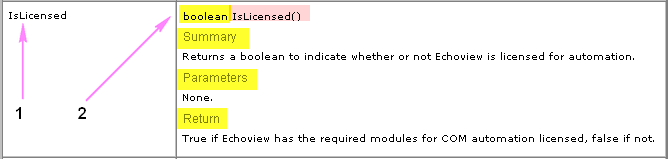
IsLicensed example
1. The name of the method or property.
IsLicensed is an EvApplication method.
2. The syntax of the method or property.
(a) The type of access can be implied or stated as (read-only) or (read-write).
(a) The type of access is implied (read-only).
(b) The syntax specifies the data type of required and optional input and the data type of the resulting output.
(b) The output for IsLicesned is boolean (yellow highlight).
No input required is required for IsLicensed (pink highlight).(c) Further information is displayed under the headings:
Summary
Parameters
Return
(c) Summary, Parameters and Return briefly describe the use of IsLicensed.
Data types
Boolean
Refer to the IsLicensed example (above).
String, Integer or int, Double, COM object
|
DetectSurface |
DetectSurface(string sSurfaceName, int iFirstPing, int iLastPing, double BetweenPingInterpolation) SummaryPerform bottom surface detection on the multibeam variable Parameters
ReturnEvObject3d |
DetectSurface is a method of the EvVariableAcoustic object.
DectectSurface inputs:
- A string (e.g. a variable called SurfaceName) for the detected bottom surface.
- An integer (e.g. a variable called FirstPing) to specify the first ping for the detection.
- An integer (e.g. a variable called LastPing) to specify the last ping for the detection.
- A double number (e.g. a variable called BetweenPingInterpolation) to specify the Maximum triangulation distance.
DetectSurface returns a detected bottom surface (with a specified name) that is accessed by the COM object EvObject3D.
DATE
A data type for the date as specified by Microsoft Office DATE.
Enum
|
DepthRangeMode |
(read-only) EDepthRangeGridMode DepthRangeMode SummaryGet the depth/range grid mode. This is specified by an enum for EDepthRangeGridMode. |
DepthRangeMode is a read-only property of the EvGrid object. The property returns information about the grid on an echogram. The information is an enum for EDepthRangeGridMode where
- eNoDRGrid = 0 (There is no depth/range grid.)
- eDepthGrid = 1 (There is a depth/range grid.)
See also: Enum issue under VBS.
Creating a script
Start by creating a file in a text editor (Notepad, for instance) and name it with the .vbs extension, for example, echoviewscript.vbs.
To connect to Echoview, first create an instance of the EvApplication object:
' Open Echoview (if Echoview is already open, connects to the
        ' open Echoview instance)
        Dim EvApp
        Set EvApp = CreateObject("EchoviewCom.EvApplication")
Notes:
-
The Echoview COM Automation module automatically creates a scripting log file when a script is run. See Scripting errors for more information about the log file.
-
This scripting log file can become very large, and slow down your processing. To ensure that your scripts run efficiently, create a command to delete the scripting log file before running the script. This command is inserted at the start of the script. For example,
Dim EvApp
Set EvApp = CreateObject ("EchoviewCom.EvApplication")
Dim FSO
Set FSO = CreateObject("Scripting.FileSystemObject")
FSO.DeleteFile(EvApp.LogFileName)
To view examples of complete COM scripts refer to Example scripts for COM automation.
See also Getting started with scripting - Script content and structure.
Determining which Echoview.exe to use
When Echoview COM objects are requested (by scripts), Microsoft Windows finds the COM object in the registered version of Echoview.
To find out which version of Echoview is registered:
- On the File menu, select Echoview Configuration.
- Click on the Scripting page to view your version details.
Note: After installing you must run Echoview once using Run as Administrator to register COM scripting. You will need to do this for each version or edition of Echoview that you install.
Echoview COM object hierarchy
The relationship of COM objects and collections to each other is discussed in the topic COM object hierarchy. The hierarchy page displays a schematic with image links to relevant COM object documentation.
COM objects and Echoview
All Echoview’s COM automation functionality is begun through the EvApplication object. Many of the create, detect and export command methods for an acoustic variable in an EV file are accessed via the EvVariableAcoustic object. The EvApplication object also enables access to the command interface.
The relationship between a COM object and Echoview is described in Summary of COM objects.
Echoview COM error handling
It is desirable to detect a failure, or error, in a running script. VBS usually produces an exception after a failure which is not very informative. An alternative for detecting failure of a method is to include a test of the validity of the returned value in the script.
The value returned for a method is usually: the object created; the number of objects created; or a boolean. In each case there is a recognized value that signals failure. NULL and -1 are used for objects or counts, and false is used for booleans. Validity of objects, for example, can be tested in VBScript by comparing them to Nothing (NULL) as in the 'Is Nothing' test for acoustic variables in the example below.
Setting the value of property does not return a value, but the set can be checked with get. A report of the reason for a failure may be accessed using the EvApplication method GetLastLogMessage().
For example:
Dim FSO: Set FSO = CreateObject("Scripting.FileSystemObject")
        Dim fOut: Set fOut = FSO.OpenTextFile("tmp.txt", 2, true)
        Dim EvApp: Set EvApp = CreateObject("EchoviewCom.EvApplication")
        Dim EvFile: Set EvFile = EvApp.OpenFile("MyEvFile.ev")
        for VarIndex = 0 to EvFile.Variables.Count-1
        Dim Var: Set Var = EvFile.Variables.Item(VarIndex)
        Dim VarAc: Set VarAc = Var.AsVariableAcoustic
        If VarAc Is Nothing Then
        fOut.WriteLine Var.Name & " is not an acoustic variable"
        Else
        Dim iCount: iCount = VarAc.DetectFishtracks("Detected Fish")
        If iCount = -1 Then
        fOut.WriteLine VarAc.Name & ": " & EvApp.GetLastLogMessage
        Else
        fOut.WriteLine Var.Name & " Schools: " & CStr(iCount)
        End If
        End If
        Next
        fOut.Close
Note: In the VBS language, NULL is returned as Nothing.
Known issues
The VBS language handles optional parameters and optional object parameters differently.
Optional object parameters can not be omitted
For example, VBS will not accept the omission of Nothing in the following:
If Not VarAc.ExportIntegrationByCells("SomeFile.csv", Nothing) Then
Optional parameters can be omitted
For example VBS will accept the following:
Set Surface = VarAc.DetectSurface("Surface”)
The above script snippet sets a variable to be the surface which is the result of the EvVariableAcoustic.DetectSurface method. In this case the omitted optional parameters default as follows: FirstPing: -1, LastPing: -1 (the whole echogram) and Maximum triangulation distance: 20.0.
VBS does not recognize Echoview COM Enum
The Echoview COM object supports a number of Enums. VBS does not support Enum usage. A workaround for VBS is to set Enum constants at the start of a script.
For example EvImpulseNoiseRemoval.SmoothingWindowUnits is specified with ESamplesOrMeters and EvImpulseNoiseRemoval.SampleReplacement is specified with EImpulseNoiseReplacement.
Const ESamplesOrMeters_Meters = 1
        Const EImpulseNoiseReplacement_Mean = 1

        Dim vEchoviewCom: Set vEchoviewCom = GetObject(, "EchoviewCom.EvApplication")
        Dim vEvFile: Set vEvFile = vEchoviewCom.OpenFile("c:\YourImpulseNoise.EV")

        Dim vEvVarIn: Set vEvVarIn = vEvFile.Variables.FindByName("Impulse noise removal 1")

        MsgBox "ImpulseNoiseRemoval.SmoothingWindowUnits: " & CStr(vEvVarIn.Properties.ImpulseNoiseRemoval.SmoothingWindowUnits)
        vEvVarIn.Properties.ImpulseNoiseRemoval.SmoothingWindowUnits = ESamplesOrMeters_Meters
        MsgBox "ImpulseNoiseRemoval.SmoothingWindowUnits: " & CStr(vEvVarIn.Properties.ImpulseNoiseRemoval.SmoothingWindowUnits)

        MsgBox "ImpulseNoiseRemoval.SampleReplacement: " & CStr(vEvVarIn.Properties.ImpulseNoiseRemoval.SampleReplacement)
        vEvVarIn.Properties.ImpulseNoiseRemoval.SampleReplacement = EImpulseNoiseReplacement_Mean
        MsgBox "ImpulseNoiseRemoval.SampleReplacement: " & CStr(vEvVarIn.Properties.ImpulseNoiseRemoval.SampleReplacement)
Windows and Echoview COM
Echoview COM (known as the Echoview Automation Library) is built into the Echoview software. To register the Echoview Automation Library with Windows you will need to run Echoview (once) under Run As Administrator. This registers Echoview and the Echoview Automation Library.
Some GoToPing options do not work when scripting in Matlab
Using the COM GoToPing Time option in Matlab requires sending a date, however Matlab doesn't support sending dates created by datenum or datetime, which are the usual way of dealing with dates in Matlab. The correct way of sending dates to COM via Matlab is to use COM.date (yyyy, mm, dd, hh, MM, ss).
See also
About automating Echoview
Getting started with scripting
Scripting errors
Summary of COM objects
COM object hierarchy