Echoview COM object hierarchy
The Echoview COM object tree has the following structure (click the COM object to view the object's methods and properties):
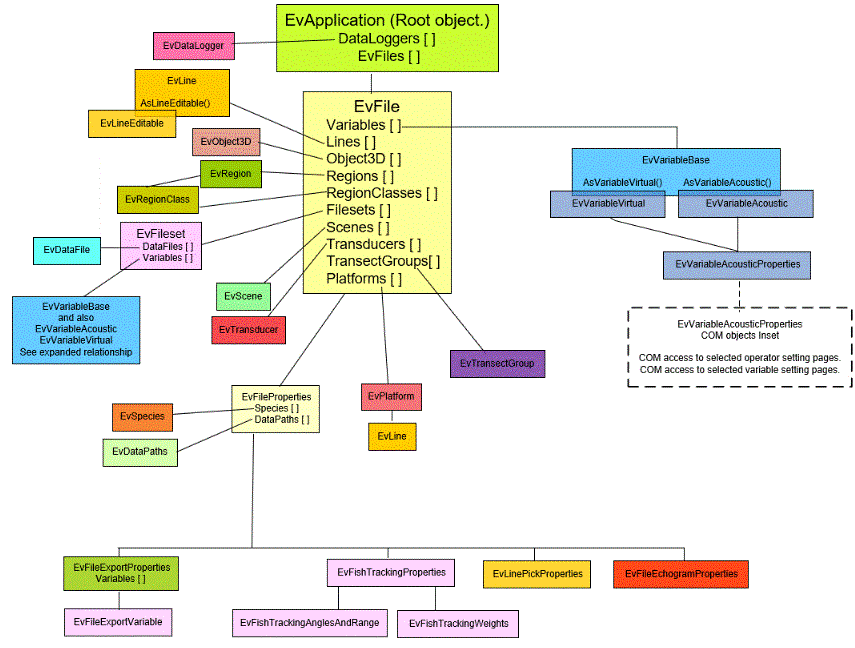
The tree shows the main COM classes (where a COM object is an instance of a COM class), COM collection [ ] objects and important COM methods (). Solid paths represent the relationship between COM objects.
EvApplication is the root object for the tree. All COM automation control of Echoview begins with this object.
For example:
An EvApplication object has an EvFiles property that is a list of all open EV files in the application. The EvApplication.EvFiles property is an EvFileCollection object. Each item in the EvFiles property is an EV file represented by an EvFile object. The EvFile object has four properties that are collection objects. They are the Variables, Filesets, Regions and RegionClasses properties.
Note: Echoview COM scripting support is limited. However, wider support via scripting is available through the command interface.
See also
About automating Echoview
Getting started with scripting
Scripting errors
Summary of COM objects