About single targets
This page covers:
- Overview
- Single target detection
- Single target display
- Configuring single target display thickness
- Target lengths from a single target echogram
- Thresholding single targets
- Display of related single targets information
- Analysis of single target data
Overview
A 'single target' in Echoview is the representation of an acoustic echo attributed to a single backscattering target detected within the beam of an echosounder. Each single target has a number of properties. Target Strength and range from the transducer are notable, but many other properties are available for analysis.
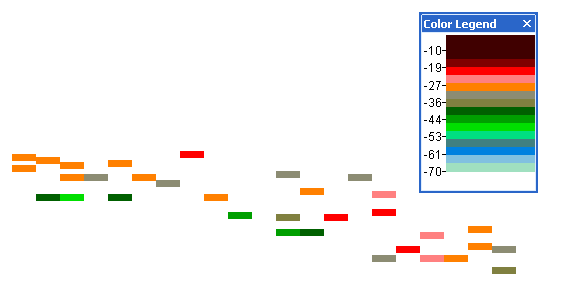
Single targets are represented on echograms as colored rectangles. See Single target display below.
They can also be:
- displayed on 3D Single Targets graphs
- analyzed on screen or in exports
- used to create 3D single targets that can be viewed in scenes
- viewed with the looped replay of associated multibeam data
- viewed on 2D graphs of selected single target properties
Detected single targets may be used for the in situ TS estimation of a species. In turn, the in situ TS estimate may be used to estimate biomass. Echoview offers outputs from the Cell statistic operator that can be used to apply confidence limits (density indices) to in situ TS estimation.
Single target data and detection
Single target data represents echoes detected with data recorded when the transmit pulse is continuous wave or frequency modulated (see About transmitted pulses).
Echoview reads single target data, detected by an echosounder, for some file formats.
Echoview offers single target detection operators for single frequency single beam, split-beam and dual beam data.
Echoview offers the single target detection - wideband operator for frequency modulated pulse compressed single beam data.
For more information refer to About single target detection and Tuning single target detection algorithms.
Wideband Frequency Response graph
A Wideband frequency response graph allows you to view the frequency response of single targets in a selection or region on pulse compressed wideband echograms.
Single target display
Single targets are displayed in Echoview as colored rectangles.
The color of the rectangles reflects the target strength according to the Color Legend dialog box.
The rectangles are displayed with the width of the ping in which the target was detected and a thickness (height) which is defined as a function of the transmitted or received pulse lengths. See Configuring single target display thickness for more information.
The top of the rectangle is displayed at the depth/range of the single target it represents.
Notes:
- When in depth mode, single targets are displayed at the Target_on_axis_depth not the Target_true_depth, see About single target depths for more information.
- To ensure that all targets are correctly detected and displayed, it is essential to utilize the correct calibration values for the variable on the Calibration and Single Target Detection page of the Variable Properties dialog box.
Single target display thickness
Echoview determines the display thickness for single targets using the equation below. You can configure display thickness by changing the appropriate settings on the Data page of the Variable Properties dialog box.
Display_thickness = Pulse_length x Thickness_factor
Where:
Pulse_length is determined by the Thickness source selected on the Data page of the Variable Properties dialog box.
Thickness_factor is the value entered as Thickness factor on the Data page of the Variable Properties dialog box.
If Pulse_length is determined from the PulseDuration it is calculated as follows:
Pulse_length (m) = c τ/ 2000
Where:
c is the Sound speed (m/s) displayed on the Calibration page of the Variable Properties dialog box.
τ is the PulseDuration (ms)—in milliseconds displayed on the Calibration page of the Variable Properties dialog box.
Notes:
- A Thickness factor of 1 or less reduces the possibility of single targets overlapping on an echogram.
- Single target display thickness is of importance to fish tracking, see Detecting fish tracks for more information.
- The multibeam target thickness calculated during multibeam target detection can be chosen as the display thickness by choosing Multibeam target thickness for Thickness source and entering 1 as the Thickness factor.
Target lengths from a single target echogram
Use the Target length conversion operator to create a single target variable (of data type target length) that reports the estimated length of each detected target.
For more information refer to Target length from single beam data.
Thresholding single targets
You can apply a threshold to isolate targets of interest in a single targets variable by using the Target property threshold operator. The target property settings of this operator allow you to nominate:
- a target property to use as a threshold
- the Minimum and/or Maximum values of the threshold
Sample values equal to or within the specified range of the target property are unchanged.
Display of related single targets information
Echoview can display related single targets information using the TS substitution operator. Such information may be sourced from:
- Target properties from multibeam target detection.
- Target length algorithm calculations.
- Custom columns in .csv single targets files.
Analysis of single target data
Echoview offers a number of ways to analyze single target data:
- 2D projections graph
- 3D single targets graph
- Frequency distribution graph
- Single target angles graph
- Single target TS-depth graph
- Calibration Assistant
- Major-axis beam compensation graph
- Minor-axis beam compensation graph
- Off-axis beam compensation graph
- Beam compensation models
- Wideband frequency response graph
- Onscreen single target analysis
- Export single target analysis
- Export single target data
- Onscreen fish track analysis
- Export fish track analysis
- Beam angle parameter adjustment
- Beam volume sum variable under Analysis domain on the Export page of the EV File Properties dialog box
- Wedge volume sampled variable under Analysis domain on the Export page of the EV File Properties dialog box
- Create 3D single targets
- Create 3D fish tracks
- Single targets from multibeam target detection
- Synchronize To Target