Multibeam School Detection Configuration Properties dialog box
The Multibeam School Detection Configuration Properties dialog box is used to view and edit settings for multibeam school detection. Echoview supports multiple region detection configurations, allowing different detection settings to be specified for different hydroacoustic conditions.
To display the Multibeam School Detection Configuration Properties dialog box:
- Display the EV File Properties dialog box.
- Click the Region Detection page.
- Under Multibeam schools, select a detection configuration.
- Click Properties.... The 3D Schools Detection page opens.
- OR -
- Display the Detect 3D Schools dialog box.
- Click Edit Region Detection Configurations....
- Under Multibeam schools, select a detection configuration.
- Click Properties.... The 3D Schools Detection page opens.
3D Schools Detection
You may view and edit the size criteria for schools and vacuoles detected on multibeam echograms. The Detection algorithm is specified on the Detect 3D Schools dialog box at the time of detection.
Size criteria
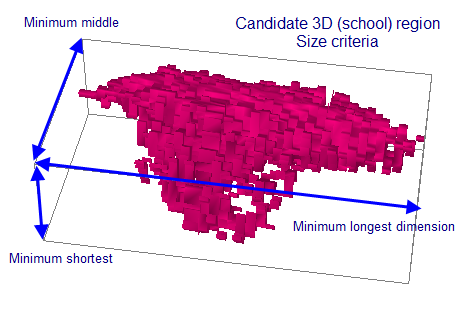
The Size criteria section controls the minimum bounding-box dimensions of detected schools (3D regions) and vacuoles.
Settings |
Description |
Minimum longest dimension (m) |
Specify the minimum longest, middle, and shortest bounding-box dimensions, in meters, for detected schools and vacuoles.
A detected school or vacuole is discarded when its bounding-box dimensions do not meet the corresponding minimum size criteria. The dimensions are ordered by length and are not tied to fixed spatial axes: the longest dimension is greater than or equal to the middle dimension, which is greater than or equal to the shortest dimension. Bounding-box dimensions and orientation are 3D object metrics. The bounding box can be displayed in a scene, and its dimensions and orientation can be viewed in the Further information box on the General page of the 3D Object Properties dialog box. Notes:
|
Minimum middle dimension (m) |
|
Minimum shortest dimension (m) |
Warning: 3D school detection can be very slow (taking hours on even a fast machine) and require large amounts of RAM. This is particularly true if the minimum 3D size limits are smaller than or near to the size of individual data samples, which means that schools containing a very small number of samples will be considered during the processing. If you find that detection is slow, does not complete in a reasonable amount of time or reports running out of memory, then consider:
- increasing the minimum dimensions on the Size criteria section
- segmenting the EV file into smaller ping ranges (say 250 pings in each range) and performing separate detections for each range
- increasing the physical RAM in your computer to the recommended amount or more (see Computer Requirements)
Notes:
- The detection can apply exclusion surfaces. For further information refer to Detecting schools on multibeam data.
- The detected school position, size and shape include transducer geometry effects.
- To view 3D regions, add them to a scene. See About the Scene window. Region-ping intersections can also be displayed on multibeam echograms.
- Each 3D region has its own 3D Object Properties dialog box where its name and appearance can be edited and details about the 3D object are available.
- You can view details about vacuoles in a 3D region or delete vacuoles on the Vacuoles page of the 3D Object Properties dialog box.
Name and Notes page
Settings |
Description |
Name |
The unique name of the multibeam school detection configuration. In Echoview, name-uniqueness affects platforms, transducers, surfaces, scenes, region classes, 3D curtains, 3D regions, lines, sticky notes, region detection configurations, raw variables and unavailable variables. Existing EV files that contain objects with the same name will open, and affected objects will be assigned a unique name. Potential duplicate names are handled by preserving the source name and appending a bracketed number (e.g., (1)). Valid names for variables and dataflow objects consist of supported characters. These can include text and symbol character encoding and international characters. Commas, double quotes, the vertical bar and the Tab key press are unsupported characters. Where a name is used as the basis of an export file name, any unsupported file name characters are automatically removed. |
Notes |
A text box in which you can enter extra information about the multibeam school detection configuration. |